03/23/2026
If you monitor your tractors using AgroSmart devices, you can integrate them into SatAgro. This means that telemetry data from the tractors will be available on the Explorer, where you can track their locations in real time.
Authorization process
To retrieve your data from your AgroSmart account, you will need to provide us with your login details. In the Integrations panel, on your user profile page in SatAgro, locate the AgroSmart option and click the Authorize button. A window with a form will appear. Enter your AgroSmart account login details and finally press Authorize button on the form.
Your tractors in SatAgro
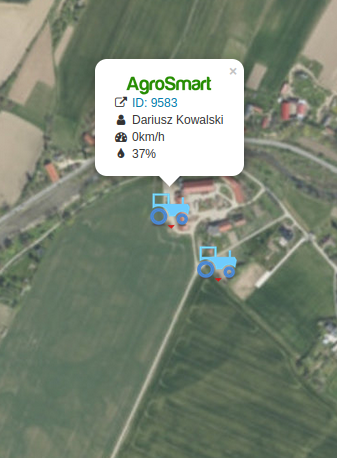
Once the integration is complete, you will see markers on the map in Explorer showing the current location of your tractors. Clicking on a marker will display the tractor’s current details, including the driver, speed and fuel level.
If you need more details, simply click on the vehicle’s name (or ID) and you will be redirected to the tractor’s page on the AgroSmart portal.
 Platforma